Monitor competitor website and pricing changes
Follow a competitor’s public pricing or product page without repeatedly opening it yourself. Start with a small set of decisions you need to make, such as whether a competing plan changed its price or removed an included feature.
A product guide by ChangeEagle · Updated
Track comparable information
Use the same country, currency and billing period whenever possible. A monthly price and an annual equivalent can look like a price change when they describe different offers. Put the plan name, billing label and price in the selected area so an alert carries enough context to interpret.
Separate the changes you care about
A pricing card, a feature list and a launch announcement answer different questions. Give each monitor a descriptive name and a focused target. This makes it easier to decide who should receive an alert and whether a change needs a response. The product’s website-tracking area also brings selected sites into one workflow.
Use alerts as evidence for a review
Compare the old and new content, visit the source and record your interpretation before changing your own offer. An automated explanation can help you find the difference; it does not establish a competitor’s intent. A weekly briefing is useful for reviewing the week, while individual alerts help you spot events between reviews.
Four changes, four decisions
Use the following fictional pricing-page examples to decide what to monitor and how to respond. Amounts are illustrative; they are not observations about a real competitor.
The amount changes
- Before
- €29 / month
- After
- €24 / month
Include the plan name, amount, currency and billing period in your target. Confirm whether the lower amount is a promotion before changing your own offer.
The allowance changes
- Before
- 10 projects included
- After
- 5 projects included
A numeric price alert can miss a smaller allowance at the same price. Monitor the visible plan text or card, then record the effective price for your workload.
The billing condition changes
- Before
- €24 / month, paid monthly
- After
- €24 / month, paid annually
The headline number is unchanged. Include the billing note in your selected region or text target so the commitment is part of your review.
An unrelated footer changes
- Before
- Footer: updated Monday
- After
- Footer: updated Tuesday
Keep the footer outside a pricing-region monitor. If you need whole-page changes, expect to review unrelated edits too. Narrow the target when they obscure the useful changes.
Bring the alert into a decision
Name the monitor after the question, assign someone to review the source, and route relevant alerts to a dedicated channel. Record the old and new offer and your next action in the template. Use the weekly briefing to revisit the week's events; individual alerts are useful between reviews. An automated explanation does not establish a competitor's intention.
Read the evidence: one page, two states
Compare the same offer in both captures. Here, the product is unchanged but its price is €15 lower. For a competitor’s subscription, also include the plan name, currency and billing period in your selection.
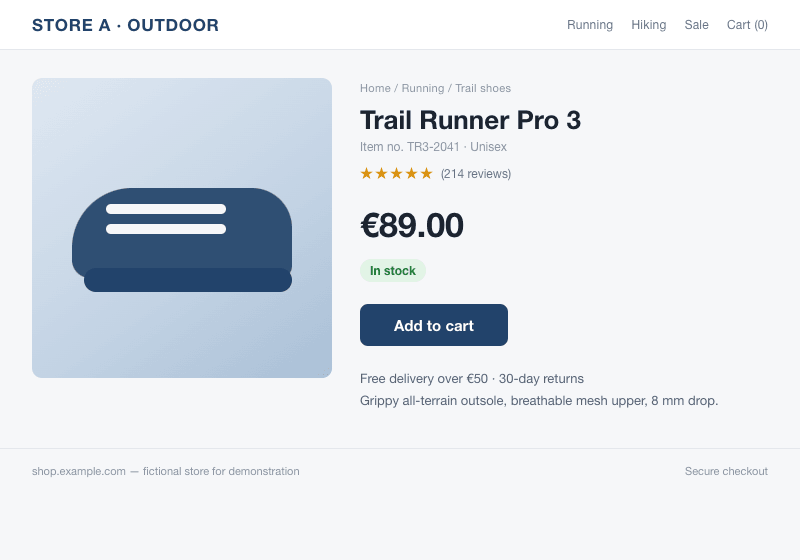
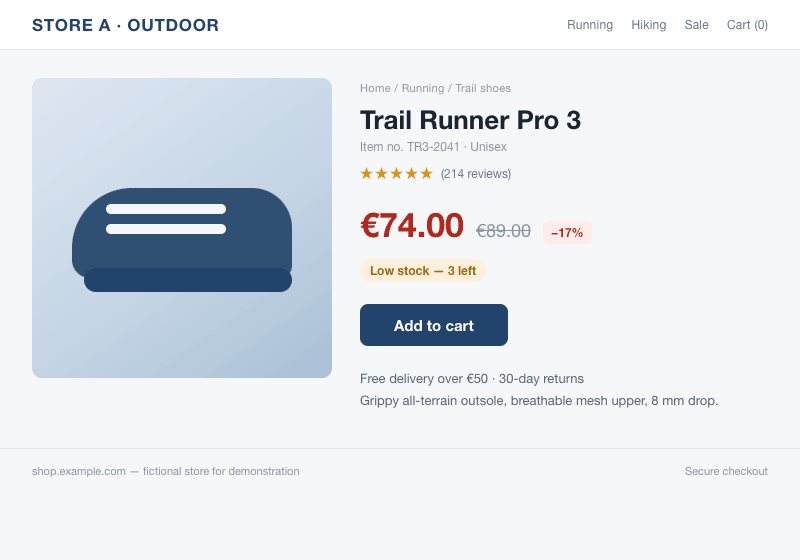
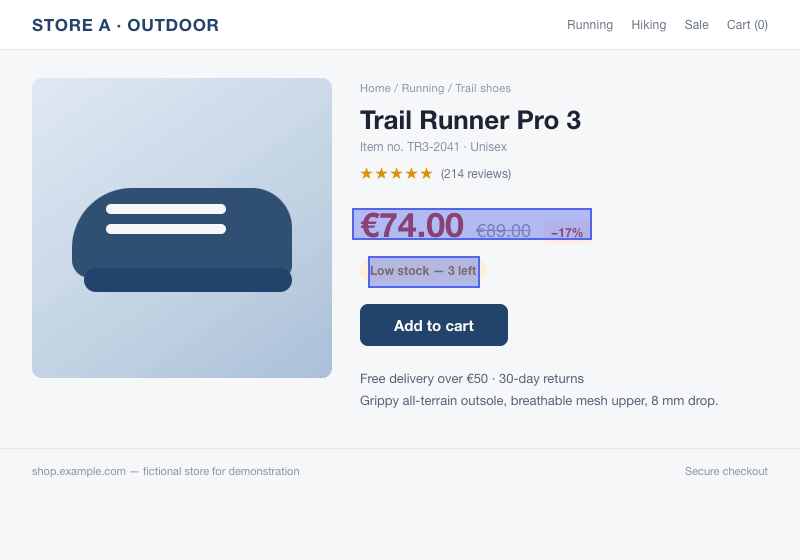
Our example uses a fictional shop and images compared by the monitoring engine. It is a demonstration, not a customer result.
Set it up
- Choose a public competitor page and the specific question you want to track.
- Create a page or text monitor. For a visual region, include the offer name, price and billing context.
- Choose a schedule your plan supports and a clear monitor name.
- Review the baseline and connect the relevant team channel if colleagues should receive the same evidence.
What to expect
Personalized pricing, location, experiments and temporary promotions can produce differences that do not apply to every buyer. Monitor public information responsibly. The service respects refusals and rate limits; it does not guarantee access to sites that block automated visits.
Screenshot monitoring starts with Pro. On that plan, picture checks run as often as every hour, subject to available credits. Text and product monitors have their own schedules.